twwinlog
TWSNMP FCのためのWindowsイベントログセンサー
| English | 日本語 |

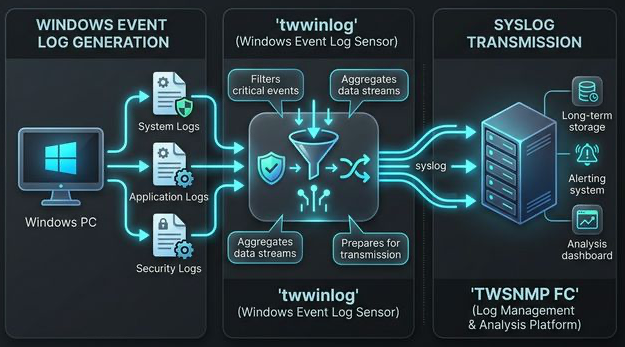
twwinlog について
twwinlog は Go言語で書かれた、軽量で効率的な Windows イベントログの収集・転送ツールです。Windows のシステム、セキュリティ、アプリケーションの各種ログをリアルタイムで監視し、外部の syslog サーバーや TWSNMP FC へ転送するように設計されています。
重量級のエージェントとは異なり、機能のシンプルさとパフォーマンスに特化しているため、小規模な監視システムからリソースの消費を抑える必要があるエンタープライズ環境まで、幅広くご利用いただけます。
主な特徴
- 🚀 高いパフォーマンス: Go言語による実装で、CPUやメモリの消費を最小限に抑えます。
- 🔍 強力なフィルタリング: 正規表現によるフィルタリングに対応し、必要なログのみを送信することが可能です。
- 📡 柔軟な転送設定: 標準的な Syslog (UDP/TCP) をサポートし、TWSNMP FC に最適化された連携が可能です。
- 🛠 セットアップが簡単: シンプルな YAML 設定と単一バイナリによる簡単な実行。
- 🛡 安全で信頼性が高い: Windows Event Log API を利用した安定したイベントのトラッキング。
取得可能な情報
現在のバージョンでは以下の情報を取得できます。
- イベント数の集計
- イベントID別の集計
- ログオンに関する情報(4624, 4625, 4648, 4634, 4647)
- アカウントの変更に関する情報 (4720, 4722, 4723, 4724, 4725, 4726, 4738, 4740, 4767, 4781)
- 特権アクセスに関する情報(4672, 4673)
- Kerberos認証に関する情報(4768, 4769)
- スケジュールタスクに関する情報(4698)
- プロセスの起動、停止に関する情報(4688, 4689)
- ログオン失敗の通知(4625)
- Kerberosチケット要求失敗の通知(4768, 4769)
- イベントログ消去の通知(1102)
ステータス
お試し版v1.0.0をリリースしました。(2021/8/8)
ログ送信改善版v1.1.0をリリースしました。(2021/8/21)
v1.1.2をリリースしました。(2025/1/26)
v2.0.0をリリースしました。(2026/3/25)
- MQTT送信機能の追加と各種イベントの構造化に対応しました。
- Syslog送信を非ブロッキング化し、通信の堅牢性を向上させました。
- ドキュメントを日本語と英語に分離し、解説用インフォグラフィックを追加しました。
- GitHub Pagesによるドキュメント公開用のサイト設定を追加しました。
ビルド
ビルドはmakeで行います。
$make
以下のターゲットが指定できます。
  all        実行ファイルのビルド(省略可能)
  clean      ビルドした実行ファイルの削除
  zip        リリース用のZIPファイルを作成
$make
を実行すればWindows用の実行ファイルが、distのディレクトリに作成されます。
配布用のZIPファイルを作成するためには、
$make zip
を実行します。ZIPファイルがdist/ディレクトリに作成されます。
実行
使用方法
Usage of twwinlog.exe:
  -auth string
        remote authentication:Default|Negotiate|Kerberos|NTLM
  -cpuprofile file
        write cpu profile to file
  -debug
        Debug Mode
  -interval int
        syslog send interval(sec) (default 300)
  -memprofile file
        write memory profile to file
  -mqtt string
        mqtt broker destination
  -mqttClientID string
        mqtt client id (default "twwinlog")
  -mqttPassword string
        mqtt password
  -mqttTopic string
        mqtt topic (default "twwinlog")
  -mqttUser string
        mqtt user name
  -password string
        remote user's password
  -remote string
        remote windows pc
  -syslog string
        syslog destination list
  -user string
        remote user name
| パラメータ | 内容 |
|---|---|
| syslog | syslogの送信先 |
| mqtt | MQTTブローカーの送信先 |
| mqttClientID | MQTTクライアントID |
| mqttUser/mqttPassword | MQTTのユーザー名パスワード |
| mqttTopic | MQTTのトピック |
| interval | チェック間隔(秒) |
| auth | リモートPCの認証方法 |
| user/password | リモートPCの認証時のユーザー名パスワード |
| remote | リモートPC |
| debug | デバッグモード |
syslogの送信先はカンマ区切りで複数指定できます。 :に続けてポート番号を指定することもできます。
-syslog 192.168.1.1,192.168.1.2:5514
起動方法
起動するためにはsyslogの送信先(-syslog)またはMQTTブローカー(-mqtt)の指定が必要です。
以下のコマンドでsyslogへ送信できます。
>twwinlog.exe -syslog 192.168.1.1
MQTTブローカーへ送信する場合は、以下のコマンドで起動します。
>twwinlog.exe -mqtt 192.168.1.1
別のPCのイベントログをモニタするためには、
>twwinlog.exe -syslog 192.168.1.1 -remote <PCのアドレス> -user <User> -password <Password>
syslog メッセージ例
送信されるsyslogのメッセージのファシリティーはlocal5です。tagはtwwinlogです。
イベントID別の集計のログの例です。
type=EventID,computer=YMIRYZ,channel=System,provider=Microsoft-Windows-Dhcp-Client,eventID=50103,total=1,count=1,ft=2025-01-23T17:19:19+09:00,lt=2025-01-23T17:19:19+09:00
TWSNMP FC パッケージ
TWSNMP FCのパッケージにtwWinlogが含まれています。
Windows版のみです。
詳しくは、
https://note.com/twsnmp/n/nc6e49c284afb
を見てください。
著作権
./LICENSE を参照してください。
Copyright 2021-2026 Masayuki Yamai