twBLE2MQTT
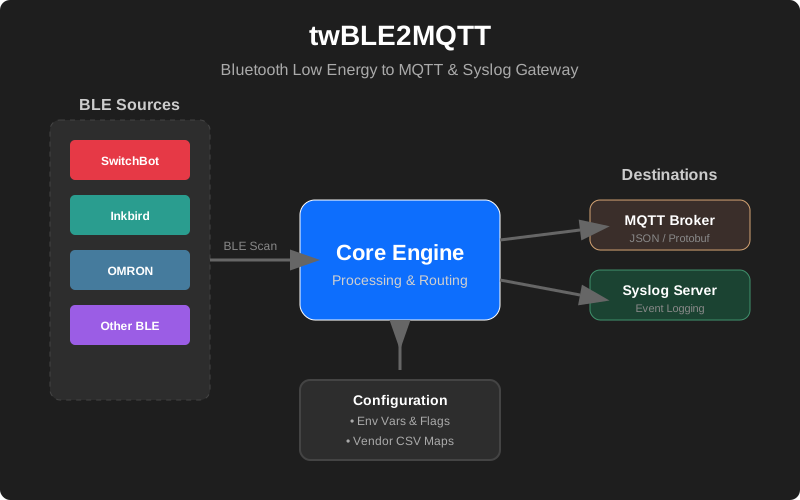
A Bluetooth Low Energy (BLE) to MQTT gateway that discovers and decodes advertising packets from various sensors. Inspired by Zigbee2MQTT.
Features
- BLE Device Discovery: Automatically scans for nearby BLE devices and reports their presence, RSSI, and metadata.
-
Sensor Decoding: Decodes advertising data from popular BLE sensors:
Vendor Model/Type Parameters SwitchBot Meter (WoSensorTH) Temperature, Humidity, Battery SwitchBot CO2 Sensor Temperature, Humidity, CO2, Battery SwitchBot Outdoor Meter (IP64) Temperature, Humidity, Battery SwitchBot Plug Mini Switch State, Overload, Load (Power W) SwitchBot Motion Sensor Movement, Light Level (Bright/Dark), Battery Inkbird IBS-TH1/TH2/etc. Temperature, Humidity, Battery, (CO2 on some models) OMRON 2JCIE-BL01/BU01 Temperature, Humidity, Light, Pressure, Noise, eTVOC, eCO2 - Multiple Destinations:
- MQTT: Publishes sensor data and device status to an MQTT broker in JSON format.
- Syslog: Sends reports and events to one or more Syslog servers.
- Vendor Mapping: Identifies device vendors using manufacturer codes or MAC address prefixes (via external CSV maps).
- Flexible Configuration: Supports both command-line flags and environment variables.
Operating Environment
- Go: Version 1.25 or later.
- Operating Systems:
- Linux (requires BlueZ installed).
- macOS (uses CoreBluetooth).
- Windows.
- Hardware: A compatible Bluetooth adapter is required.
Installation / Build
Using Go Directly
To build the binary for your current platform:
- Clone the repository:
git clone https://github.com/twsnmp/twBLE2MQTT.git cd twBLE2MQTT - Build the binary:
go build -o twble2mqtt
Using mise-en-place
This project supports mise for managing the Go toolchain and automated build tasks.
- Install
miseif you haven’t already. - Build for all supported platforms (Linux, macOS, Windows) and architectures (amd64, arm64, armv7):
mise run buildThe resulting binaries will be located in the
dist/directory. - To clean the build artifacts:
mise run clean
Usage
Starting the Gateway
You must specify at least one destination (MQTT or Syslog).
./twble2mqtt -mqtt tcp://localhost:1883 -syslog 192.168.1.100:514
Command Line Flags
| Flag | Environment Variable | Description | Default |
|---|---|---|---|
-mqtt |
TWBLUESCAN_MQTT |
MQTT broker destination (e.g., tcp://broker:1883) |
”” |
-mqttUser |
TWBLUESCAN_MQTTUSER |
MQTT username | ”” |
-mqttPassword |
TWBLUESCAN_MQTTPASSWORD |
MQTT password | ”” |
-mqttClientID |
TWBLUESCAN_MQTTCLIENTID |
MQTT client ID | twBlueScan |
-mqttTopic |
TWBLUESCAN_MQTTTOPIC |
MQTT base topic | twBlueScan |
-syslog |
TWBLUESCAN_SYSLOG |
Comma-separated list of Syslog destinations | ”” |
-interval |
TWBLUESCAN_INTERVAL |
Interval for sending periodic reports (seconds) | 600 |
-all |
TWBLUESCAN_ALL |
Report all addresses (including private/random) | false |
-debug |
TWBLUESCAN_DEBUG |
Enable debug mode | false |
Environment Variables
All configuration flags can be overridden by environment variables prefixed with TWBLUESCAN_.
Monitoring
You can monitor the data collected by twBLE2MQTT using TWSNMP FK.
License
This project is licensed under the Apache License 2.0. See the LICENSE file for details.