twSdrPower
twSdrPower is a lightweight sensor application that leverages RTL-SDR to monitor radio frequency (RF) power across a wide range (24MHz - 1.7GHz). It enables real-time visualization of spectrum usage by streaming data via MQTT and Syslog, making it an ideal tool for electromagnetic noise surveys and network-integrated RF monitoring.

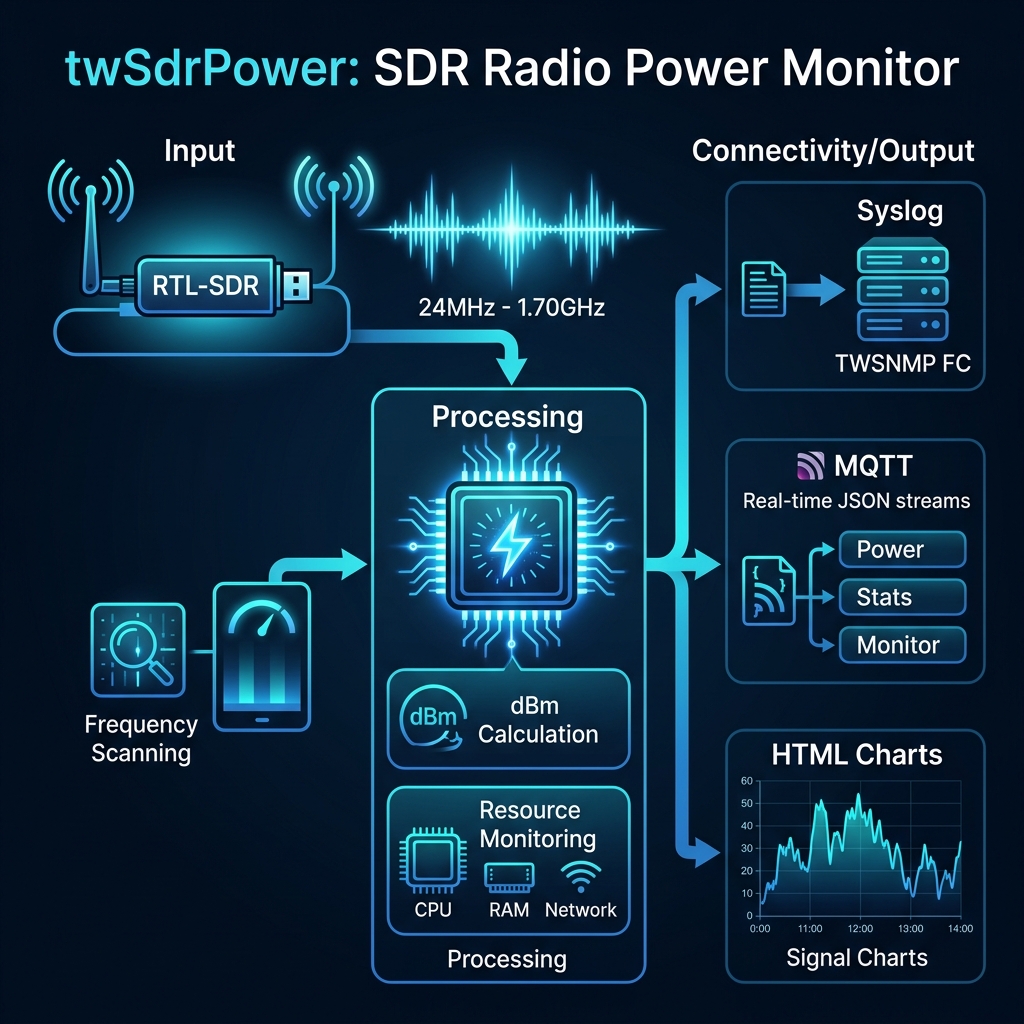
Overview
twSdrPower is a sensor program that uses RTL-SDR to monitor the strength (power) of surrounding radio waves and sends the information to management systems such as TWSNMP FC via Syslog or MQTT. It is useful for electromagnetic noise surveys and visualizing the usage status of specific frequency bands.
Key Features
- Frequency-specific Power Monitoring: Scans a specified range (24MHz - 1.7GHz) and calculates the signal strength (dBm) for each frequency.
- Multi-protocol Transmission: Collected data can be transmitted in real-time via Syslog (RFC5424 format) or MQTT (JSON format).
- Resource Monitoring: Monitors the CPU, memory, and network usage of the device where the sensor is running and sends it as statistical information.
- Visual Analysis: Features automatic output of scan results as HTML charts. Dark mode is also supported.
Data Details
The current version can obtain and transmit the following information:
- Radio Strength Data (Power): Radio strength information for each frequency (default 1MHz unit) in the specified range (default 24MHz - 1.67GHz).
- Resource Monitor (Monitor): Resources of the sensor itself (CPU usage, memory usage, network transmission/reception).
- Statistics (Stats): Operational statistics such as the number of scans, total data count, and number of successful transmissions.
The acquired radio strength can also be output as a graph (HTML format).
Status
v2.0.0 Added MQTT transmission function, improved build environment
Build
Env
To build, you need the following:
- Go 1.25 or higher
- librtlsdr
- Docker (required for building the Linux version)
- make
The RTL-SDR library can be installed with Homebrew on Mac OS.
brew install librtlsdr
The Linux version is built within a Docker environment, so it can be built if the host environment has make and Docker.
Build
Building is done with make.
$ make
The following targets can be specified:
  all        Build all executables (Mac, Linux amd64/arm/arm64)
  mac        Build executable for Mac
  clean      Delete built executables and the dist directory
  zip        Create a ZIP file for release
The built executables are created in the dist directory.
Run
Env
To run, the RTL-SDR library is required. On Mac OS, it can be installed with brew as described in the development environment section. Please install the rtl-sdr package in the Linux environment.
$ sudo apt install rtl-sdr
Usage
Usage of twSdrPower:
  -chart string
    	chart title
  -dark
    	dark mode chart
  -debug
    	Debug mode
  -end string
    	end frequency (default "1667M")
  -folder string
    	chart folder (default "./")
  -gain int
    	RTL-SDR Tuner gain (0=auto)
  -interval int
    	syslog/MQTT send interval(sec) (default 600)
  -list
    	List RTL-STR
  -mqtt string
    	MQTT broker destination (e.g., 192.168.1.1:1883)
  -mqttClientID string
    	MQTT client ID (default "twSdrPower")
  -mqttPassword string
    	MQTT password
  -mqttTopic string
    	MQTT topic (default "twsnmp/twSdrPower")
  -mqttUser string
    	MQTT user
  -once
    	Only once
  -sdr int
    	RTL-SDR Device Number
  -start string
    	start frequency (default "24M")
  -step string
    	step frequency (default "1M")
  -syslog string
    	syslog destination list (comma separated)
Syslog Destination Configuration
Multiple syslog destinations can be specified by comma-separating them. It is also possible to specify a port number.
-syslog 192.168.1.1,192.168.1.2:5514
MQTT Transmission Configuration
Specify the MQTT broker information.
-mqtt 192.168.1.1:1883 -mqttTopic my/topic
Data sent via MQTT is in JSON format. It is sent to the following topics:
{topic}/Power: Radio strength data{topic}/Stats: Statistical data{topic}/Monitor: Resource monitor data
Example of Startup (for Mac OS)
./dist/twSdrPower.darwin -chart noise -gain 500 -dark -folder /tmp -interval 300 -sdr 0 -mqtt 192.168.1.250:1883
Find Device
You can check the connected RTL-SDR device by starting it with the -list option.
$ ./dist/twSdrPower.darwin -list
Device List count=1
0,Generic RTL2832U OEM,Realtek,RTL2838UHIDIR,00000001
The 0 at the beginning is the device number (value specified with the -sdr option).
Copyright
see ./LICENSE
Copyright 2022-2026 Masayuki Yamai