twSecScan
twSecScan is an AI-powered, zero-dependency security scanner desktop application. Built with Wails and Svelte 5, it delivers a full security suite as a single cross-platform binary — no external tools like nmap or nuclei required.
✨ Key Features
- 9 Scan Modules covering network, web, API, cryptographic, and local filesystem security
- AI-powered mitigation advice via Ollama (local), OpenAI, or Anthropic
- Zero external dependencies — all scanners implemented in pure Go
- Single binary — portable deployment, no installation required
- Bilingual UI — English and Japanese, with automatic OS language detection
- Report export — HTML, Markdown, and JSON formats
- Scan History — persistent storage via bbolt embedded database
🗺️ Overview
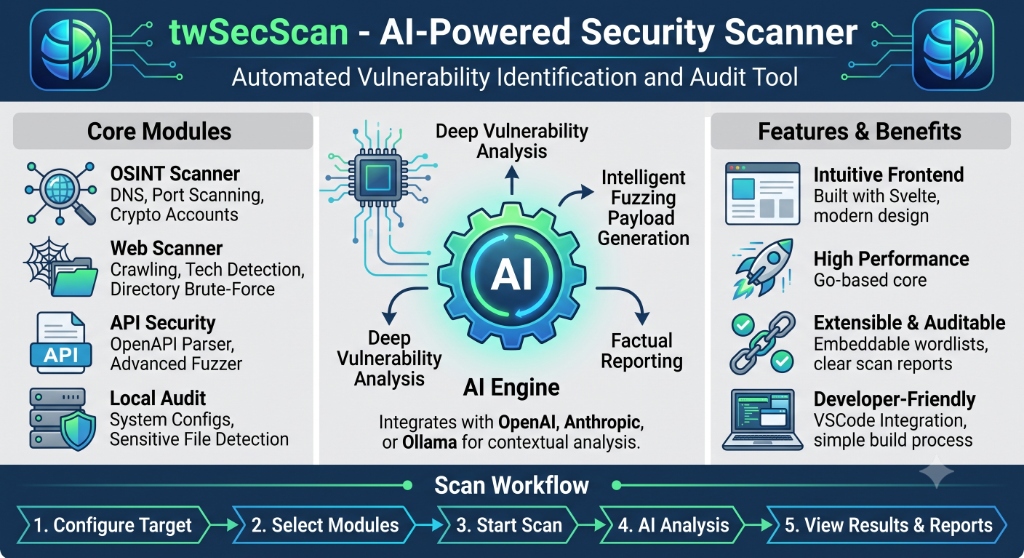
twSecScan provides four Core Modules (OSINT, Web, API Security, Local Audit), an AI Engine that integrates with OpenAI, Anthropic, or Ollama, and a five-step Scan Workflow — all delivered as a single binary.
🖥️ Screenshots
Dashboard
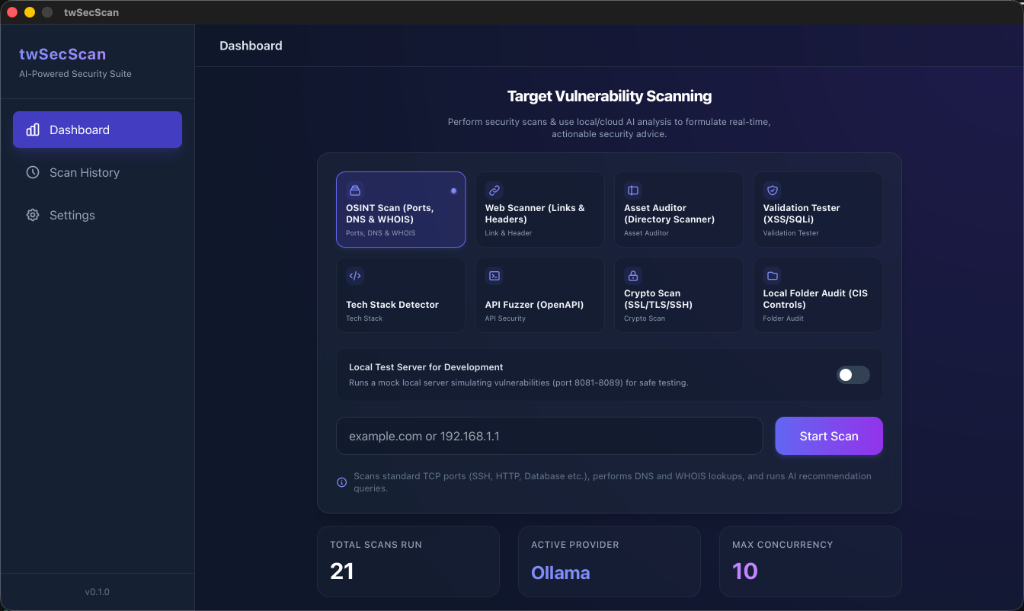
Enter a target URL or IP, select a scan module, and click Start Scan.
Findings & AI Advice
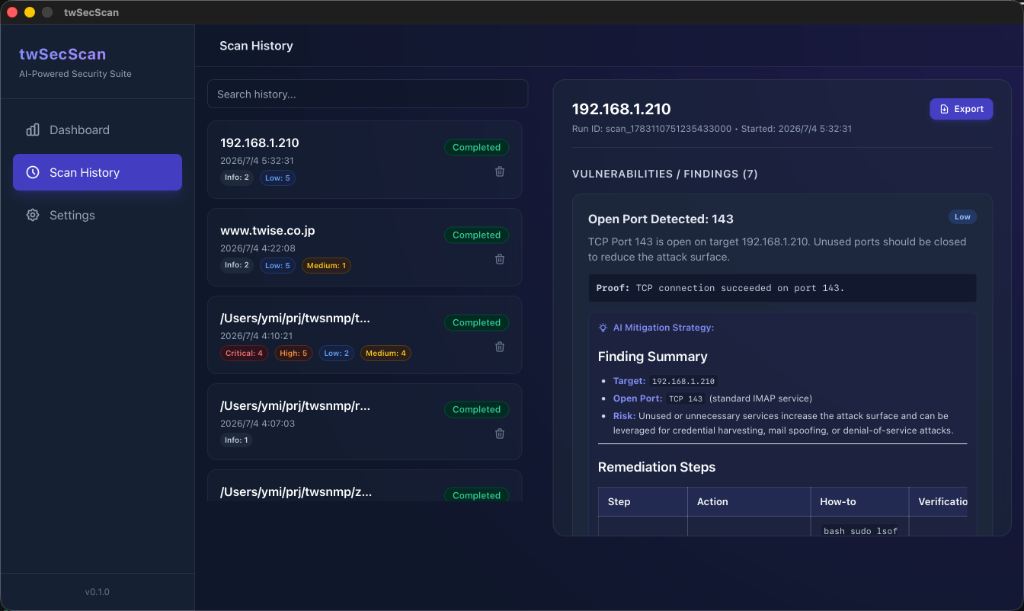
Scan results are displayed with severity badges (Critical / High / Medium / Low / Info) and AI-generated mitigation strategies.
Settings
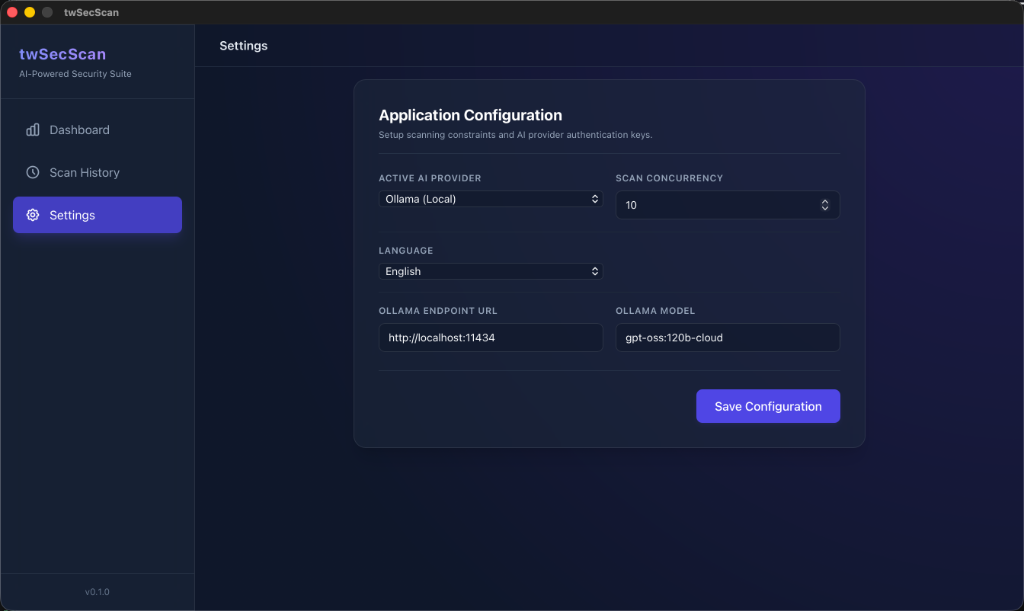
Configure your AI provider (Ollama, OpenAI, Anthropic), scan concurrency, and UI language.
🔍 Scan Modules
| Module | Description | Target |
|---|---|---|
| OSINT Scan | TCP port scan on common ports + DNS & WHOIS lookup | IP or domain |
| Web Scanner | Recursive crawler for broken links, HTTP security headers, PII exposure | https://... |
| Asset Auditor | Probes for exposed config files, backups, .git, admin panels |
https://... |
| Validation Tester | Crawls pages and tests URL parameters for XSS & SQL Injection | https://... |
| Tech Detector | Identifies web server, CMS, frameworks from headers and HTML | https://... |
| API Fuzzer | Parses OpenAPI 3.0 spec and runs dynamic security fuzzing on all endpoints | URL or local file |
| DNS & WHOIS | Standalone DNS record + WHOIS registrar information lookup | Domain |
| Crypto Scanner | Checks SSL/TLS certificates, SSH banners, and mail server encryption (SMTP/IMAP/POP3) | IP or domain |
| Local Folder Audit | Walks a local directory checking for secrets, insecure permissions, and CIS Controls compliance | Local path |
🤖 AI Integration
twSecScan integrates with LLM providers to generate actionable mitigation advice for every finding.
| Provider | Configuration |
|---|---|
| Ollama (default) | Runs locally. Set the endpoint URL (default: http://localhost:11434) and model name |
| OpenAI | Provide your API key in Settings |
| Anthropic | Provide your API key in Settings |
If no AI provider is configured, findings are still recorded with full technical details.
🛠️ Tech Stack
| Component | Technology |
|---|---|
| Backend | Go (pure Go, no CGO) |
| Frontend | Wails v2 + Svelte 5 (Runes) + Tailwind CSS |
| Database | bbolt (embedded key-value store) |
| OpenAPI Parser | getkin/kin-openapi |
| Build Toolchain | mise (Go + Node.js + Wails version management) |
🚀 Getting Started
Prerequisites
- mise — development toolchain manager
Install Toolchain
# Install Go, Node.js, and Wails via mise
mise install
Development
# Start in development mode (hot reload)
wails dev
Build
# Build a production binary
wails build
The output binary (twSecScan) is placed in the build/bin/ directory.
📁 Project Structure
twSecScan/
├── main.go                    # Wails entry point
├── app.go                     # Backend bindings (Frontend ↔ Backend)
├── core/
│   ├── db/bbolt.go            # Persistent storage (bbolt)
│   └── models/models.go       # Config, Scan, Finding structs
├── modules/
│   ├── ai/                    # LLM client abstraction (Ollama/OpenAI/Anthropic)
│   ├── apisec/                # OpenAPI parser + API fuzzer
│   ├── osint/                 # Port scanner, DNS/WHOIS, Crypto scanner
│   ├── webscanner/            # Crawler, Asset auditor, Validation tester, Tech detector
│   └── localaudit/            # Local folder CIS audit
├── embed/
│   └── wordlists/             # Embedded wordlists (directories, subdomains)
└── frontend/src/
    └── App.svelte             # Single-file Svelte 5 UI
📊 Report Export
After a scan completes, click the Export button in the Scan History view to save the report:
- HTML — Styled, self-contained report with severity badges
- Markdown — Plain text report suitable for documentation
- JSON — Raw
{scan, findings}data for programmatic use
🗄️ Data Storage
Scan history and settings are stored in a database file created automatically at the following platform-specific location:
| OS | Default Path |
|---|---|
| macOS | ~/Library/Application Support/twSecScan/twSecScan.db |
| Windows | %APPDATA%\twSecScan\twSecScan.db |
| Linux | ~/.config/twSecScan/twSecScan.db |
Custom Database Path (CLI option)
Use the --db-path flag to override the default location:
# Store in the current directory
./twSecScan --db-path ./mydata.db

# Specify an absolute path
./twSecScan --db-path /home/user/backup/scan.db
[!NOTE] When launched from a launcher or app package, the default path is used automatically. The
--db-pathflag is only effective when running from the command line.
⚠️ Legal Notice
twSecScan is intended for authorized security testing only. Always obtain explicit permission before scanning any system or network you do not own. Unauthorized scanning may violate laws and regulations.