twearth 🌍⚡
twearth (TWSNMP Earth) is a cross-platform desktop and mobile application for real-time monitoring, visualization, and statistical/AI analysis of global and local natural environment data—including weather, jet streams, sea surface temperatures, earthquakes, volcanoes, lightning, river levels, and space weather—with no user registration or API keys required. Built with Wails v3, Svelte 5, and Go. Part of the TWSNMP project family.
🗺️ System Workflow & Architecture
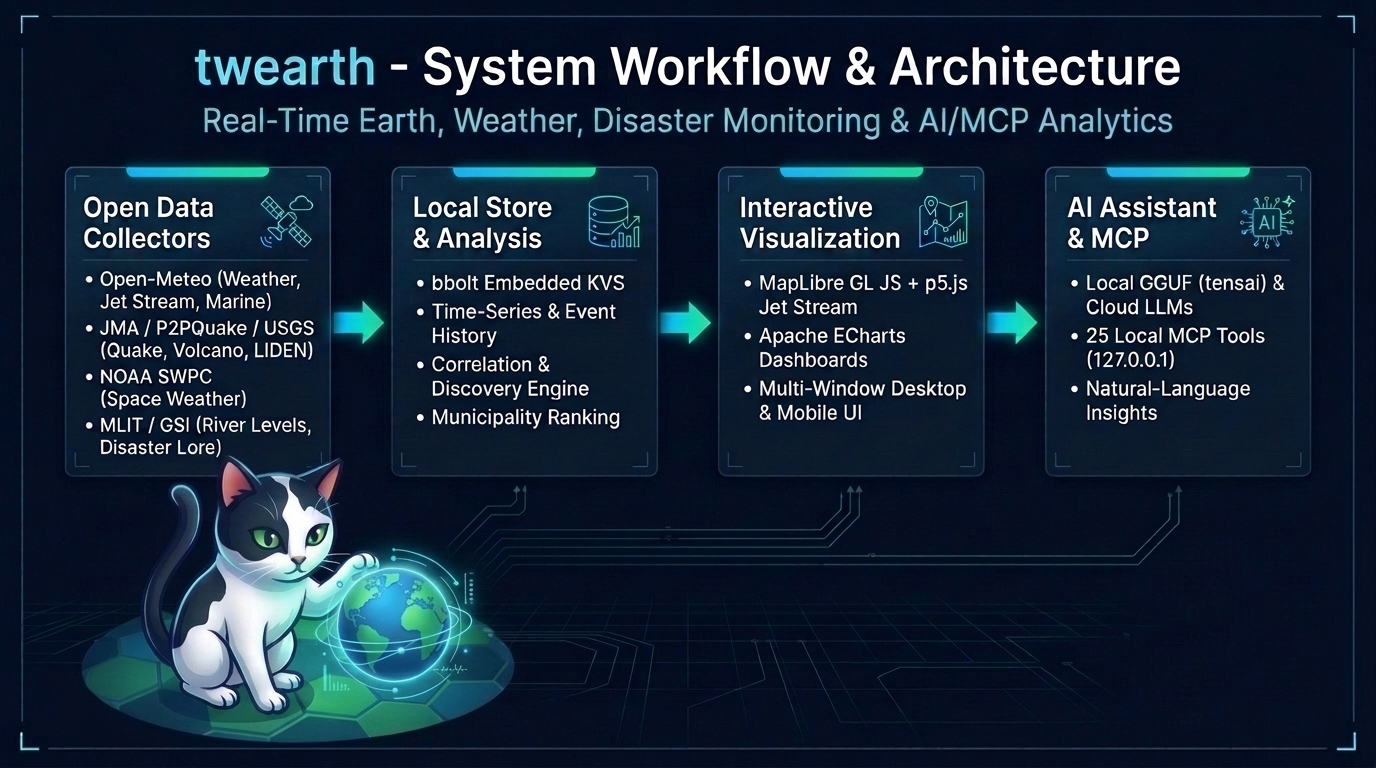
twearth integrates open environmental data collection (Open-Meteo, JMA, P2PQuake, USGS, NOAA SWPC, MLIT, GSI) with local bbolt time-series storage, MapLibre + p5.js + ECharts visualization, statistical correlation & regional ranking engines, and local/cloud AI + MCP server integration.
✨ Key Features
- 🗺️ Interactive Map & Real-Time p5.js Overlays — Combines
MapLibre GL JS(dark OSM, GSI pale/relief/hazard tiles, JMA radar/Kikikuru) with a synchronizedp5.jscanvas to animate 250 hPa jet stream particle flows, earthquake epicenters, and LIDEN lightning flashes. - 🌦️ Multi-Location Weather, Air Quality & Marine Monitoring — Tracks surface pressure (with 3-hour change), temperature, humidity, CAPE, PM2.5, yellow dust, UV index, and marine SST / wave height / ocean currents—including El Niño / climate monitoring regions (
NINO.3,NINO.WEST,IOBW). - 🌋 Comprehensive Disaster & Hazard Watch — Real-time WebSocket earthquake & tsunami feeds (P2PQuake) + USGS global quakes, JMA volcano alert levels & XML bulletins, LIDEN lightning proximity, JMA Kikikuru risk maps, MLIT river levels, and GSI disaster lore monuments.
- ☀️ Synoptic & Space Weather — Visualizes synoptic isobars & H/L pressure centers, upper-air 250 hPa / 500 hPa winds, and NOAA SWPC planetary Kp-index & GOES X-ray solar flux.
- 📊 Correlation Analysis, Discovery & Regional Ranking — Built-in statistical engine supporting lagged correlation, deseasonalization, differencing, robustness evaluation, automated correlation discovery, and Japan-wide municipality environmental ranking.
- 🪟 Multi-Window Desktop Workspace & Mobile UI — Detach Charts, Synoptic, Marine, Events, Correlation, Discovery, and Ranking panels into independent windows with one-click tiling (Grid, Horizontal, Vertical, Cascade), plus a responsive tab layout for iOS/Android.
- 🤖 AI Assistant & Local Embedded LLM (
tensai) — Ask natural-language questions about your environment data using an embedded local GGUF model (tensaiwith built-in Model Manager) or cloud/local LLMs (Google Gemini, OpenRouter, OpenAI / Compatible, Anthropic Claude, Ollama). - 🔌 Local-Only MCP Server (25 Tools) — Built-in Streamable HTTP MCP server (
127.0.0.1:18088, disabled by default) exposing environmental summaries, disaster logs, correlation analysis, and municipality rankings to AI agents. - 💾 Local-First Persistence & Auto-Update — Embedded
bboltkey-value store keeps all configuration, time-series history, and event logs locally; desktop builds support automatic updates via GitHub Releases. - 🌐 Bilingual UI — Seamless switching between English and Japanese interfaces.
🖥️ User Interface & Operation Guide
twearth provides a unified main workspace on desktop with detachable multi-window panels and a touch-friendly tabbed layout on mobile.
1. Main Map & Live Dashboard
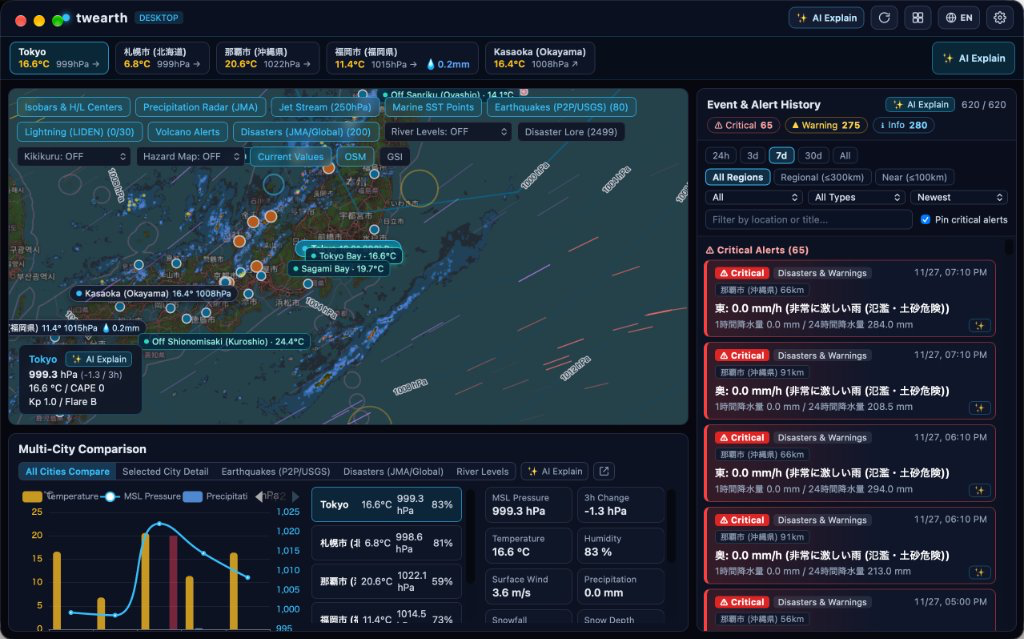
- Location Strip & Quick Metrics: Displays your primary and registered observation cities with current temperature, pressure, 3h pressure trend, CAPE, and nearby lightning counts.
- Interactive Layer Controls: Toggle 250 hPa jet stream particles, isobars & H/L centers, JMA precipitation radar, earthquakes, volcano alerts, LIDEN lightning, river levels, Kikikuru (landslide/inundation/flood), GSI hazard maps, disaster lore monuments, and marine SST points.
- Map Coordinate Picking: Click anywhere on the map to inspect or register new observation points.
2. Multi-Location & Time-Series Charts
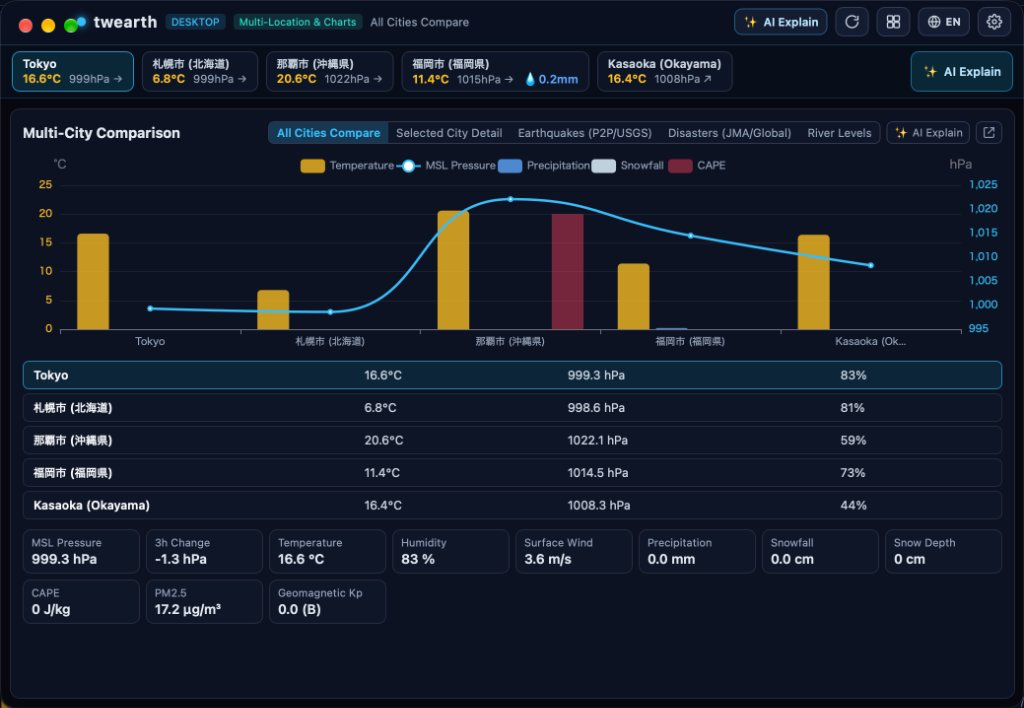
- Apache ECharts Visualizations: Compare pressure trends, temperature, precipitation, CAPE, PM2.5/dust, and nearby lightning across multiple registered cities or focus on a single city’s detailed history.
- Window Popout: Pop out the charts panel into its own dedicated window for multi-monitor setups.
3. Synoptic, Space Weather & Marine SST Monitor
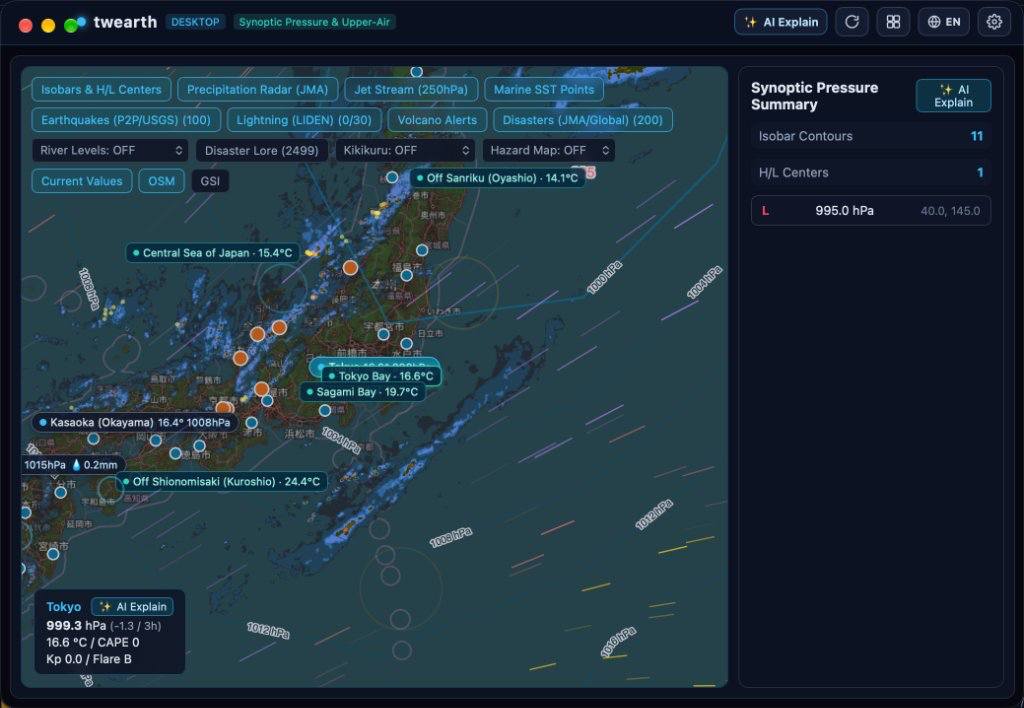
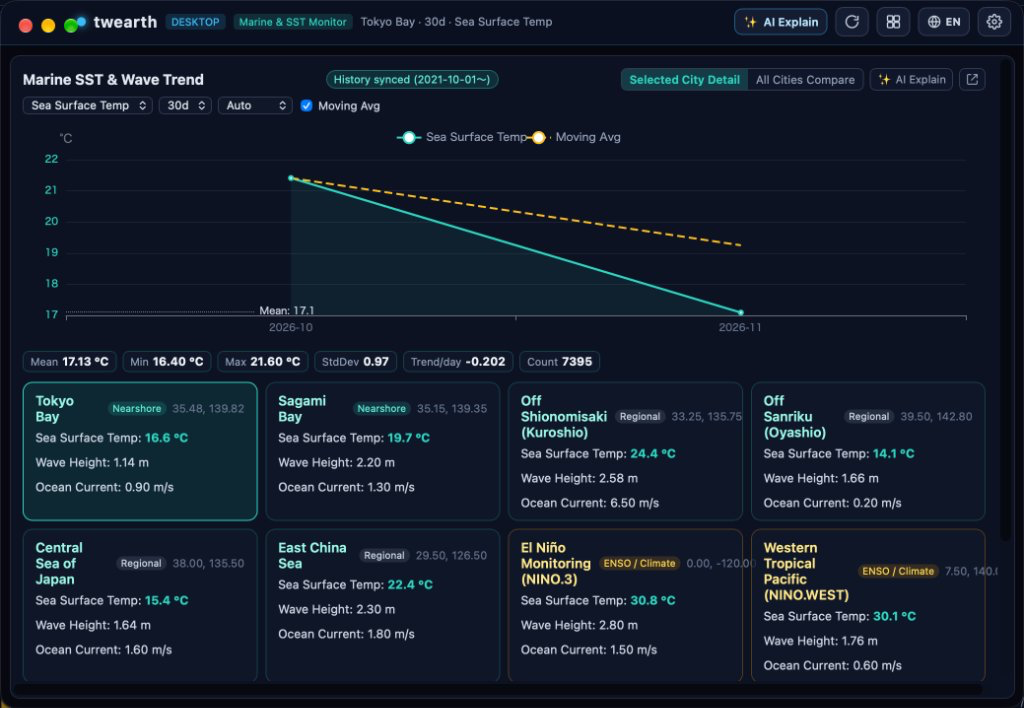
- Synoptic & Space Weather: Inspect 250 hPa / 500 hPa upper-air patterns alongside NOAA SWPC Kp-index geomagnetic storm gauges and GOES X-ray solar flux charts.
- Marine & ENSO Monitoring: Auto-select nearshore/regional sea points relative to your primary city and monitor El Niño / climate indices (
NINO.3,NINO.WEST,IOBW) with sea surface temperature, wave height, and ocean current vectors.
4. Event & Alert History (Earthquake, Volcano & Hazard Log)
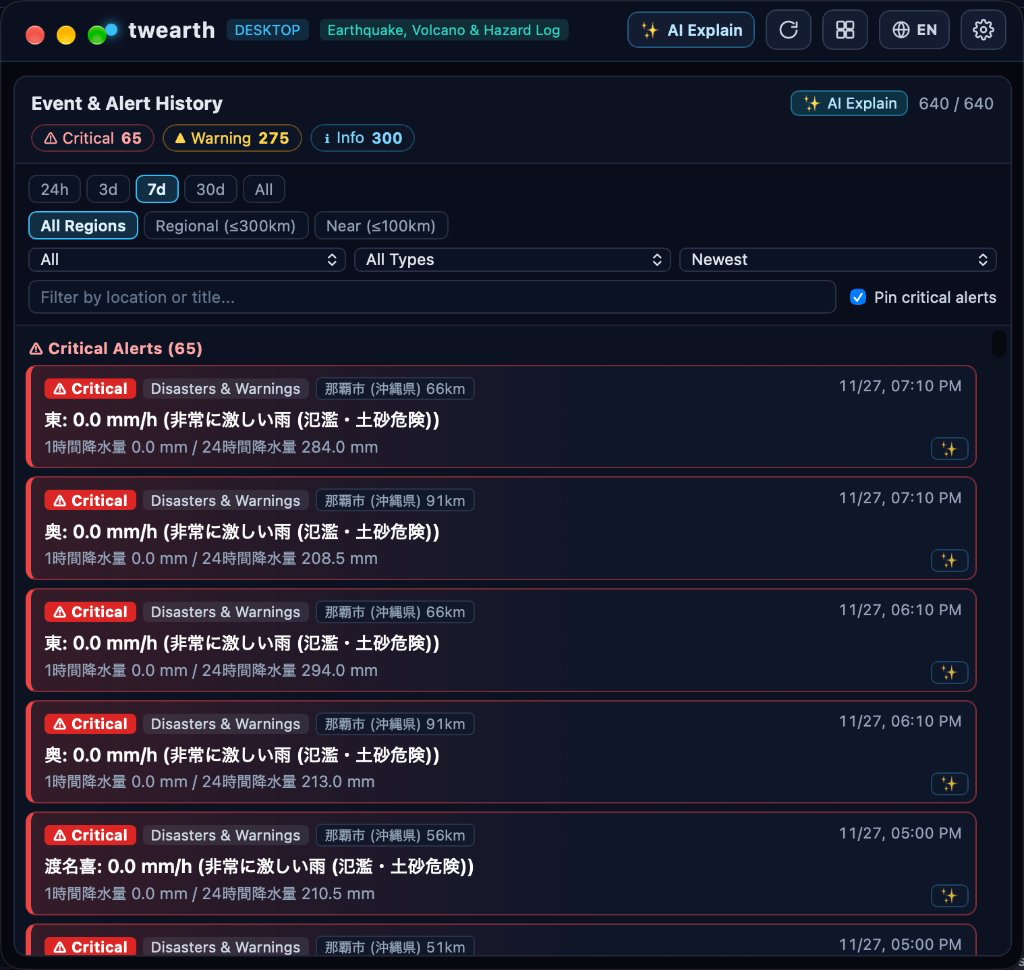
- Unified Disaster & Alert Feed: Aggregates earthquakes, volcano alerts, heavy rain/flood warnings, and regional hazards with severity badges (
Critical,Warning,Info), time-range filters (24h,3d,7d,30d,All), and distance filters (All Regions,Regional ≤300km,Near ≤100km). - One-Click AI Explanation: Pin critical alerts to the top and click the AI button on any event or feed to get an immediate summary and risk assessment.
5. Correlation Analysis, Discovery & Regional Ranking
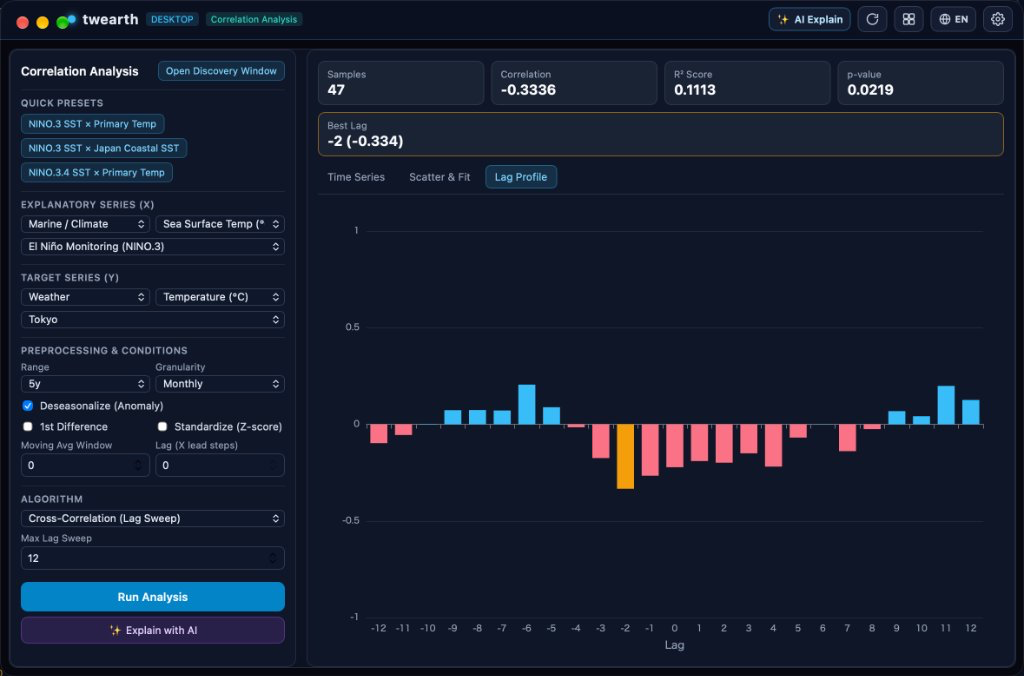
- Correlation Analysis & Robustness: Analyze relationships between environmental variables (e.g., pressure drops vs. lightning, SST vs. regional weather) with lag offsets, deseasonalization, differencing, and 4-mode robustness checks.
- Correlation Discovery: Automatically scans combinations of metrics and locations to surface statistically notable correlations.
- Municipality Ranking: Ranks and compares Japanese municipalities across environmental and hazard metrics.
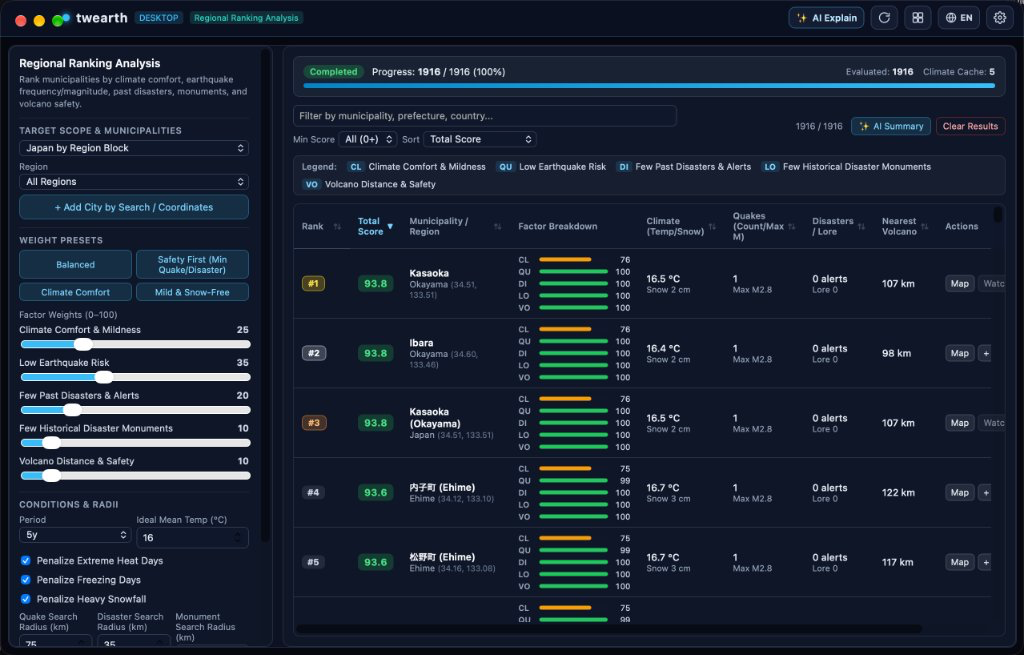
6. AI Assistant & Local Model Manager
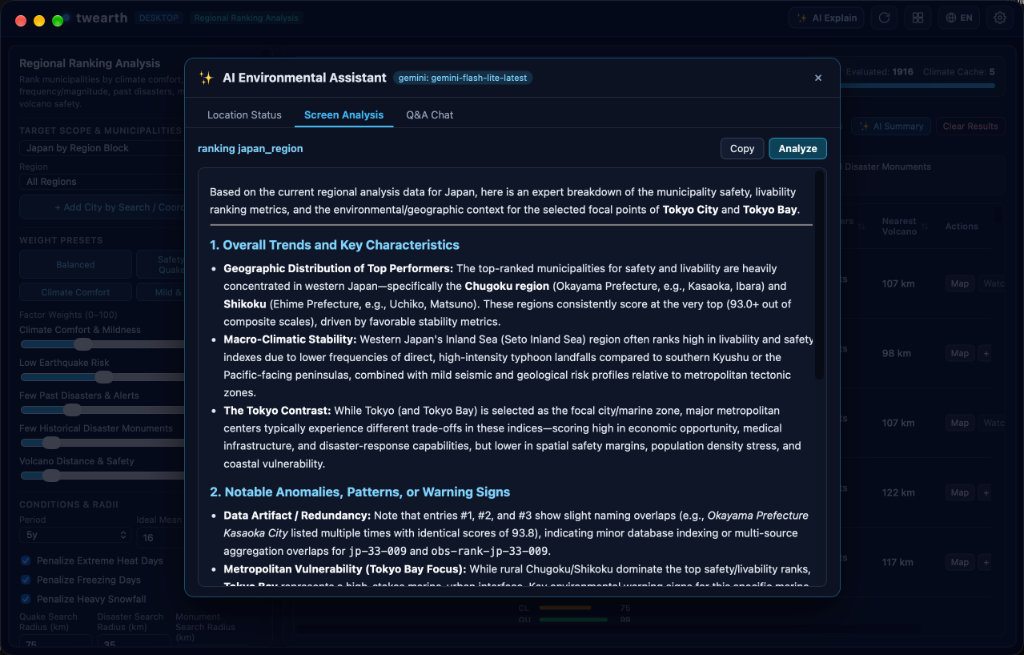
- Context-Aware Q&A: Discuss current weather, recent earthquakes, correlation findings, or disaster risks with an AI assistant that automatically receives relevant local telemetry context.
- Embedded Local LLM (
tensai): Download and run GGUF models directly on your machine without external API keys or internet access for inference.
7. Settings & Multi-Window Controls
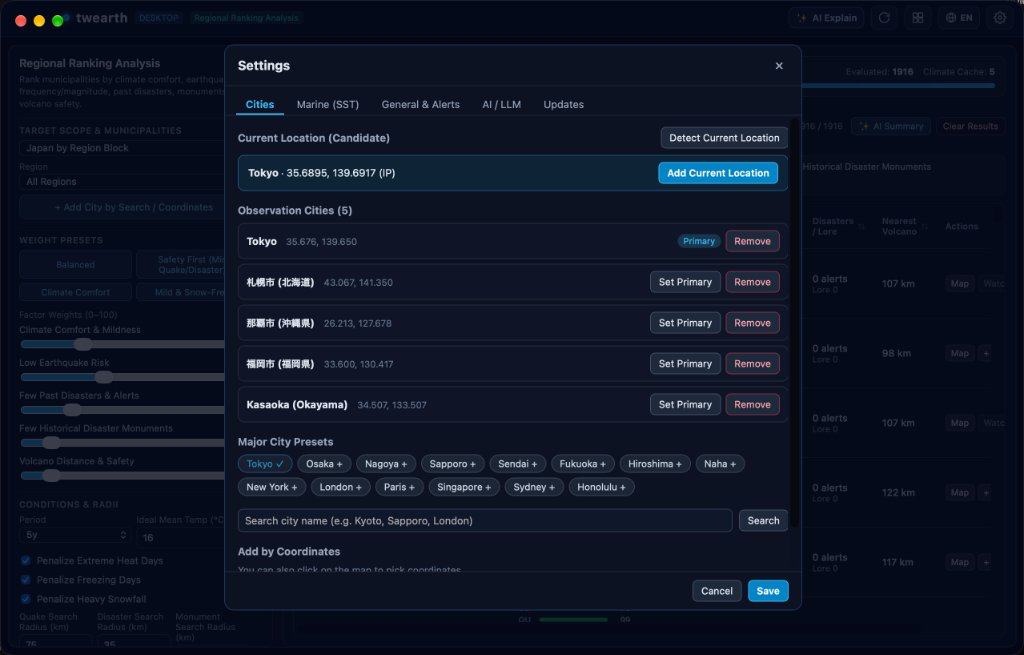
- Organized Tabbed Settings:
- Locations: Manage primary/secondary cities (search by name, auto-detect, presets, or coordinates).
- Marine: Configure auto-selection of nearshore/regional sea areas and ENSO/climate points.
- General: Polling intervals, alert thresholds, UI preferences, and Local MCP Server (
127.0.0.1:18088) toggle. - AI / LLM: Choose
tensai(embedded GGUF), Google Gemini, OpenRouter, OpenAI / Compatible, Anthropic, or Ollama. - Update (Desktop only): Check and apply GitHub Release updates.
📡 Data Sources (No API Keys Required)
| Category | Provider / Source | Data Collected |
|---|---|---|
| Weather & Upper-Air | Open-Meteo Forecast API | Surface/MSL pressure, temp, humidity, precipitation, CAPE, 250 hPa & 500 hPa wind/geopotential grids |
| Air Quality | Open-Meteo Air Quality API | PM2.5, PM10, dust, UV index |
| Marine & SST | Open-Meteo Marine API | Sea surface temperature (SST), wave height, ocean current velocity & direction |
| Earthquakes & Tsunami | P2PQuake API v2 / JMA / USGS | Real-time WebSocket hypocenter/intensity, tsunami forecasts, global M4.5+ earthquakes |
| Site Amplification | NIED J-SHIS | Surface ground amplification factor & geomorphologic classification |
| Volcanoes | JMA Volcano JSON / XML | Active volcano list, eruption warning levels, eruption & ashfall bulletins |
| Lightning & Radar | JMA LIDEN / Nowcast / Kikikuru | Lightning strikes, precipitation radar, landslide/inundation/flood risk tiles |
| Rivers & Lore | MLIT / GSI | River water levels, GSI base/hazard tiles, natural disaster lore monuments |
| Space Weather | NOAA SWPC | Planetary Kp-index (1m) & GOES primary X-ray flux (6h) |
🔌 Local MCP Server Integration
Desktop builds include a local-only Model Context Protocol (MCP) server using Streamable HTTP (POST /mcp, GET /mcp, DELETE /mcp) bound strictly to 127.0.0.1:<port> (default port 18088, disabled by default) with loopback IP, Host, and Origin validation.
Exposed MCP Tools (25 Tools)
- Current & Summary:
get_earth_summary,get_current_weather,get_current_marine,get_synoptic_and_space - Hazards & Disasters:
list_alert_events,list_recent_quakes,list_volcanoes,list_active_disasters,get_river_levels - History & Lore:
analyze_environment_history,search_disaster_lore - Locations & System:
search_and_manage_locations,trigger_data_refresh,get_mcp_and_system_status - Correlation Analysis:
get_correlation_catalog,analyze_correlation,evaluate_correlation_robustness,manage_correlation_discovery,list_correlation_discoveries - Municipality Ranking:
get_municipality_ranking_catalog,manage_municipality_ranking,list_municipality_rankings,get_municipality_ranking_detail,compare_municipalities,get_analysis_overview
🛠️ Tech Stack
| Component | Technology |
|---|---|
| App Framework | Wails v3 (Desktop & Mobile) |
| Backend | Go 1.27 (GOEXPERIMENT=simd) |
| Frontend | Svelte 5 (Runes) + TypeScript + Vite + Tailwind CSS |
| Mapping & Particles | MapLibre GL JS + p5.js |
| Charts & Gauges | Apache ECharts |
| Database | bbolt (Embedded Key-Value Store) |
| AI / LLM | github.com/mattn/tensai (Embedded GGUF) + langchaingo |
| Packaging | macOS Universal PKG (Notarized), Windows ZIP / NSIS Installer, Linux tar.gz |
🚀 Installation & Releases
Download Prebuilt Packages
Visit the Releases page to download binaries for your platform:
- macOS (Universal: Apple Silicon & Intel): Download the signed and notarized
.pkginstaller (built viascripts/release-mac.sh). - Windows (x64): Download
twearth-windows-amd64-installer.exeortwearth-windows-amd64.zip. - Linux (x64): Download
twearth-linux-amd64.tar.gz, extract, and runtwearth(requireslibgtk-4-dev/libwebkitgtk-6.0-devruntime libraries).
💻 Development Setup
Prerequisites
- mise (Manages Go 1.27 and Node.js 22 via
mise.toml) - Wails v3 CLI (
go install github.com/wailsapp/wails/v3/cmd/wails3@v3.0.0) - Linux only:
sudo apt-get install -y libgtk-4-dev libwebkitgtk-6.0-dev build-essential pkg-config - Mobile builds (optional): Xcode (iOS) or JDK + Android SDK/NDK (Android)
Setup & Run
# Install Go and Node.js via mise
mise install

# Install frontend dependencies
cd frontend
npm install
cd ..

# Run in development mode
mise run dev

# Run Go tests
mise run test

# Build desktop binary
mise run build

# Build, sign, and notarize macOS Universal release
mise run release-mac
🗄️ Data Directories
Configuration, cached time-series data, event logs, and the bbolt database are stored locally in the OS application config directory:
| Platform | Default Path |
|---|---|
| macOS | ~/Library/Application Support/twearth/ |
| Windows | %APPDATA%\twearth\ |
| Linux | ~/.config/twearth/ |
📄 Specifications & License
- Architecture & Design Specification: SPEC.md
- License: Apache License 2.0